Under the Hood: How Elastic Defend Monitors APIs via Kernel ETW
EDR Overview
What is EDR?
Endpoint detection and response (EDR) is a cybersecurity solution that monitors endpoint activity, detects suspicious behavior, and helps security teams investigate and respond to threats in real time. With capabilities such as behavioral analytics, automated response, and threat intelligence integration, EDR solutions help teams protect servers, laptops, desktops, and mobile devices. As AI continues to advance, EDR solutions will become more predictive and adaptive, allowing teams to prevent more attacks and recover faster from the threats that do get through.
Key Features
Threat detection: Identifies malicious activity and indicators of compromise (IOCs) on endpoints. Telemetry collection: Gathers comprehensive endpoint data to support investigations. Remote response: Enables quarantine, remote command execution, and rapid forensics.
### Why Your Endpoints Need EDR
Detecting Modern Attacks
EDR can help counter modern attack techniques, though not perfectly:
Fileless and custom malware: Malicious code that runs in memory and is never written to disk. Living-off-the-Land (LotL): Abuse of legitimate, built-in system tools.
Additional Value
Even when real-time detection fails, telemetry enables post-incident investigation. Remote commands from the web console allow rapid forensic analysis.
For Red Teamers
EDR is one of the main obstacles red teams must overcome.
Why Elastic Security?
Free 14-day trial: We can build the full lab at no cost during the trial period. Open detection rules: Most Elastic Security rules are public, so we can see exactly why an alert fired. Strong detection: Elastic catches many common loader and injection techniques, making it ideal for testing and refining our approach.

EDR Architecture & Components
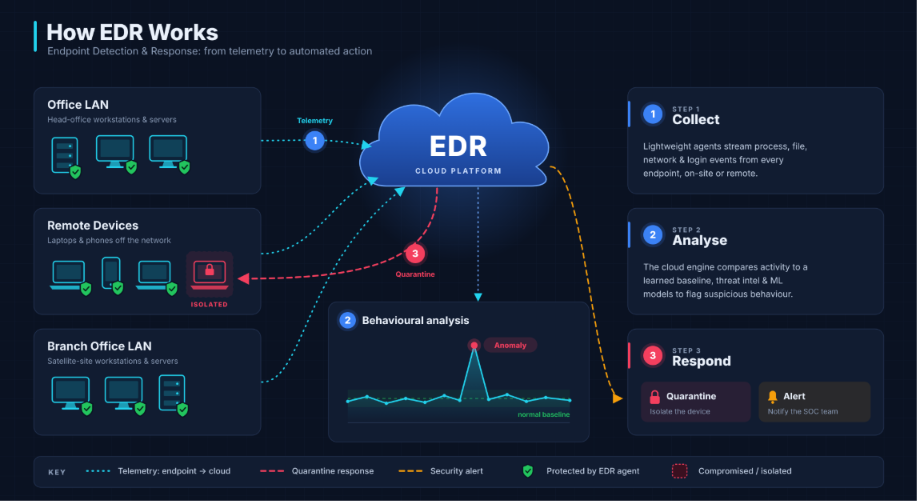
Main Components
Here’s a polished version as a table:
| Component | Description |
|---|---|
| Agent | Software on each endpoint that collects data, performs lightweight analysis, and blocks threats. |
| Telemetry | A continuous stream of system activity (process events, file operations, network connections) recorded by the agent. |
| Backend | Centralized infrastructure for storage, processing, and ML/AI-based analysis. |
| Management Console | The interface for visibility, policy configuration, response actions, and investigations. |
Under the Hood: Detection Mechanisms
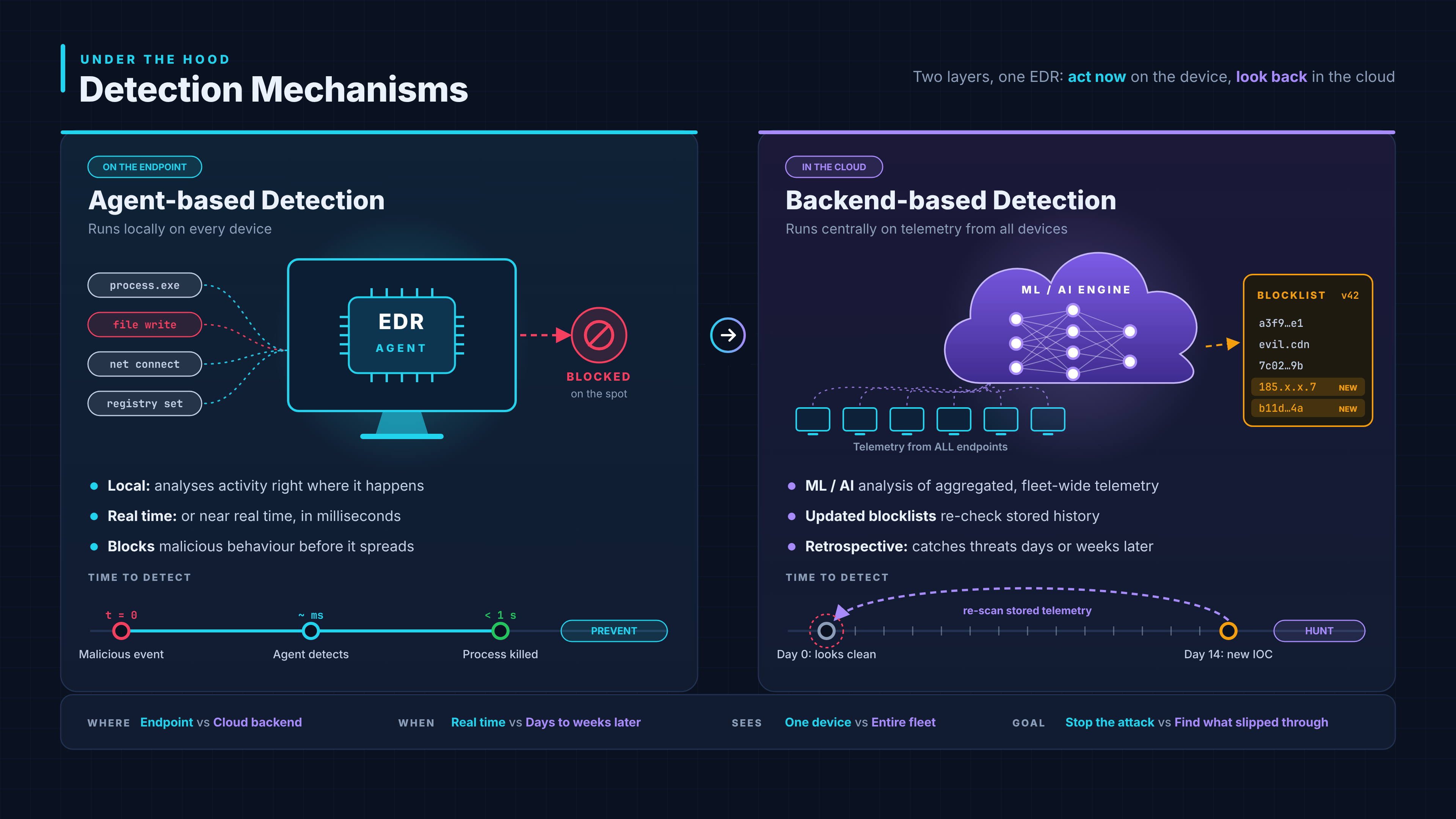
Agent-based Detection
Runs locally on the endpoint. Analyzes activity in real time or near real time.
Backend-based Detection
Applies ML/AI analysis to aggregated telemetry from all endpoints. Updated blocklists enable retrospective detection over days or weeks.
Agent-based Detection
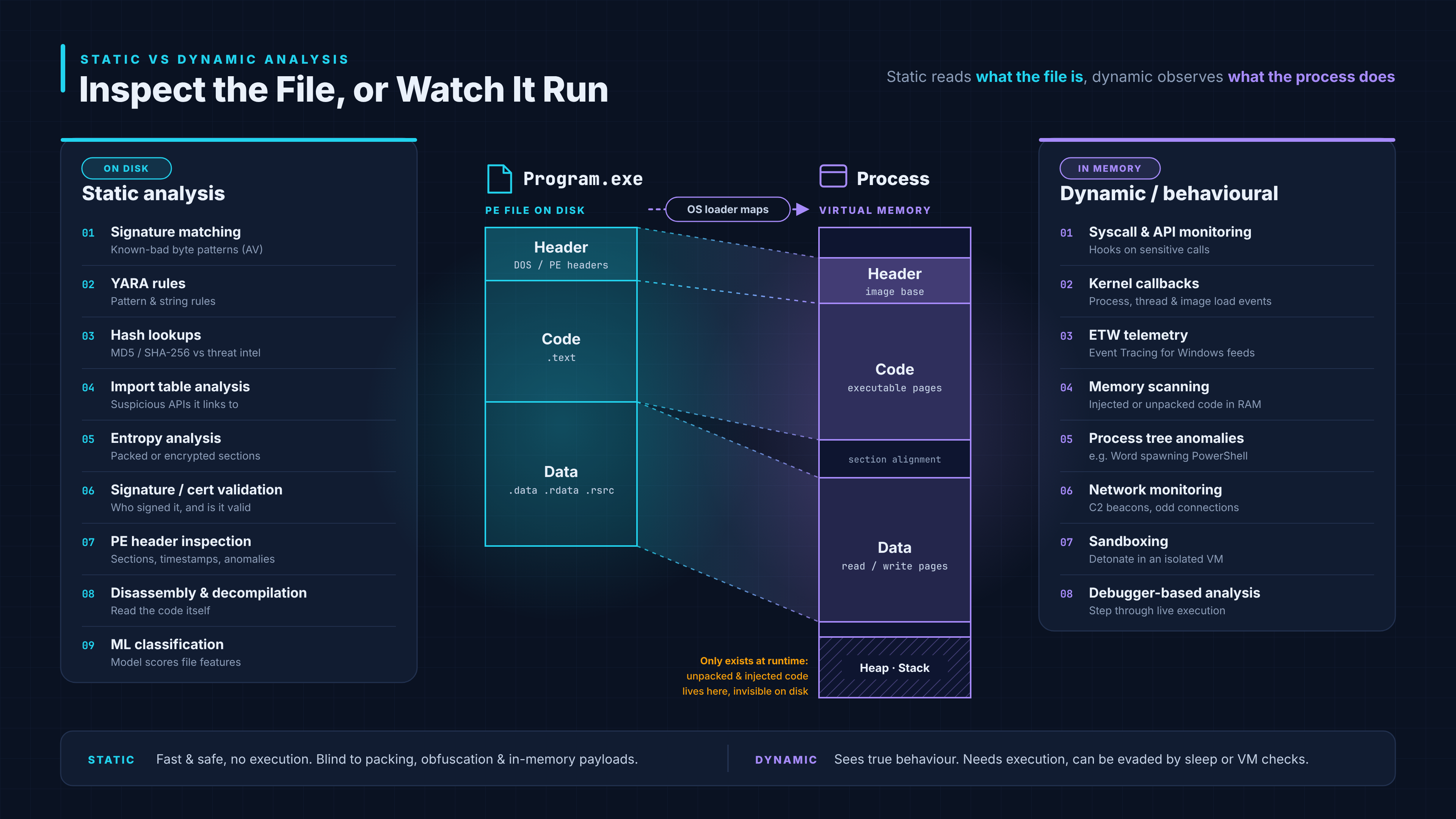
Pre-Execution: Static Analysis
Target: file on disk (e.g., Program.exe)
Signature matching against known malware YARA rules for pattern-based detection Hash lookups (MD5, SHA-256) against threat intel Import table analysis for suspicious APIs Entropy analysis to spot packed or encrypted code Digital signature and certificate validation PE header and section inspection Disassembly & decompilation ML-based file classification
During Execution: Behavioral Analysis
Target: running process in memory
Syscall & API call monitoring Kernel callbacks (process, thread, image load) ETW telemetry (e.g., .NET, AMSI, Threat-Intelligence provider) Memory scanning for injected code and shellcode Process tree and parent-child anomaly detection Network connection monitoring Sandboxing Debugger-based analysis
Core Telemetry Signals
Here’s a polished, enriched version:
| Category | Data Points |
|---|---|
| Process Activity | Process creation and termination, command lines, parent-child relationships, loaded DLLs |
| Memory Activity | Process injection, remote thread creation, suspicious memory allocations |
| Network Activity | TCP/UDP connections, DNS queries, URLs visited |
| File System Activity | File creation, modification, renaming, and deletion |
| Registry Activity | Key and value changes, persistence locations (e.g., Run keys) |
| User Account Activity | Logons and logoffs, account creation, deletion, and modification, privilege changes |
| Device Activity | USB device connections, removable media file transfers |
EDR Agent Components
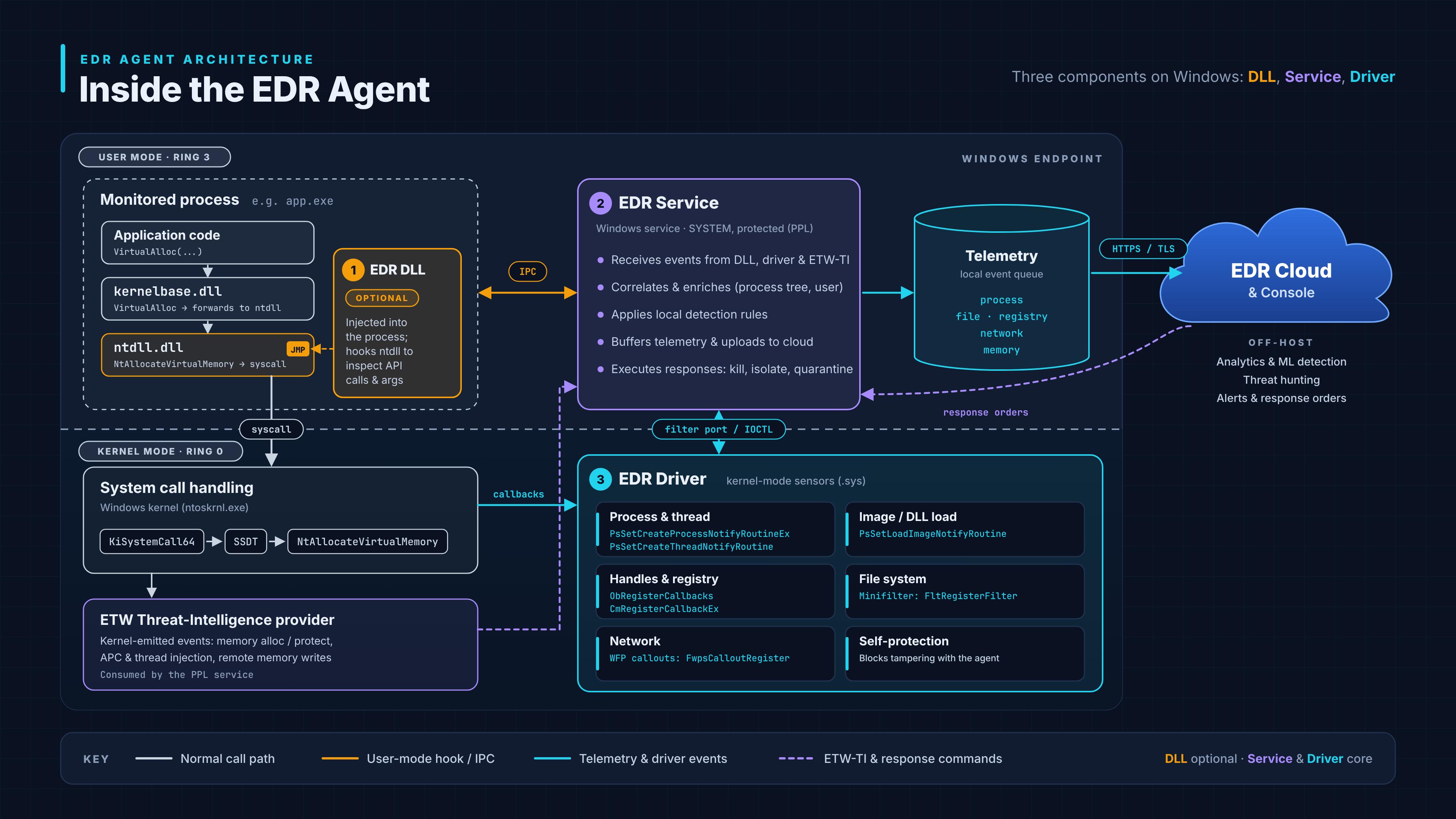
An EDR agent works across two layers of the operating system: user space, where normal applications run, and kernel space, the core of the OS.
1. User Space: In-Process Components (optional)
Some EDRs inject a DLL into running processes to hook sensitive APIs (e.g., memory allocation, thread creation). This lets the EDR inspect calls before they execute, giving fine-grained local visibility.
2. User Space: EDR Service
The agent’s “brain” on the endpoint, running as a privileged background service. Gathers telemetry from the driver and hooks, applies local detection rules, and communicates with the backend and console.
3. Kernel Space: EDR Driver
The deepest and most trusted layer, hard for malware to bypass. Kernel callbacks: notified on process, thread, and image (DLL) load events. Minifilters: monitor file system operations. Network filters (WFP): observe and block network traffic.
EDR Agent: Screenshots
Kernel-Level Components Used by EDR
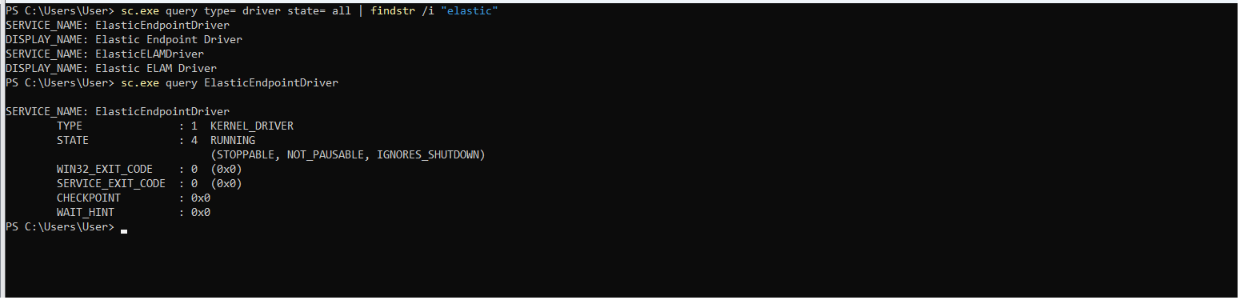
Kernel-level components provide self-protection mechanisms that help protect EDR processes and services against unauthorized termination attempts, even by users with SYSTEM privileges. 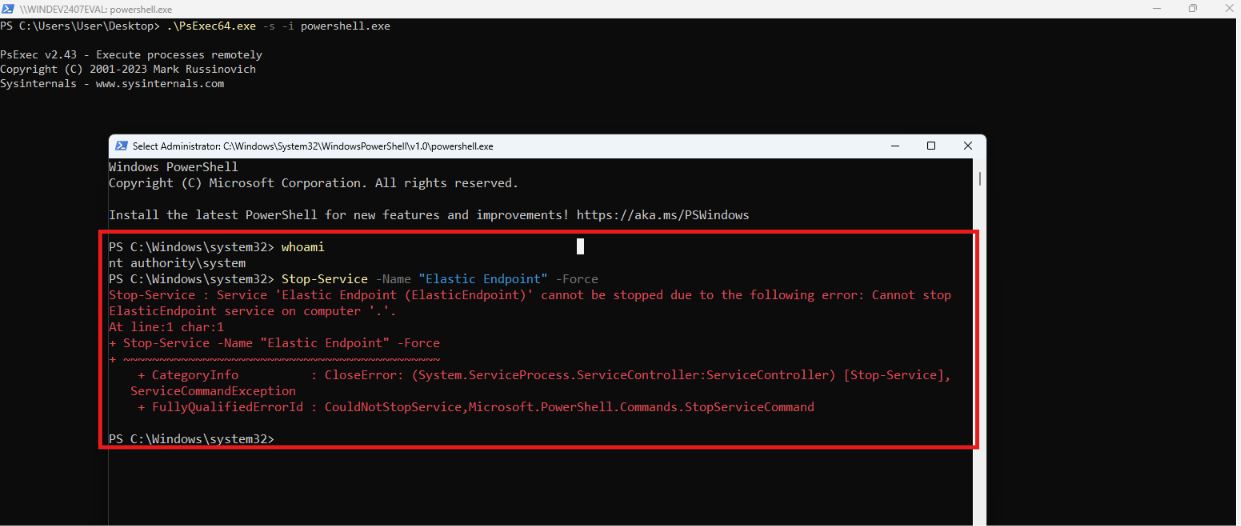
API Hooking (User Space)
API hooking lets an EDR intercept selected function calls inside a process, so it can inspect activity before the system call reaches the kernel.
Inline Hook
Overwrites the first bytes (prologue) of a function with a jump to the EDR’s handler. The handler inspects the call, then resumes the original function.
IAT Hook (Import Address Table)
Replaces a function’s address in the process’s import table with the EDR’s handler. Only catches calls made through that table, so it is easier to bypass
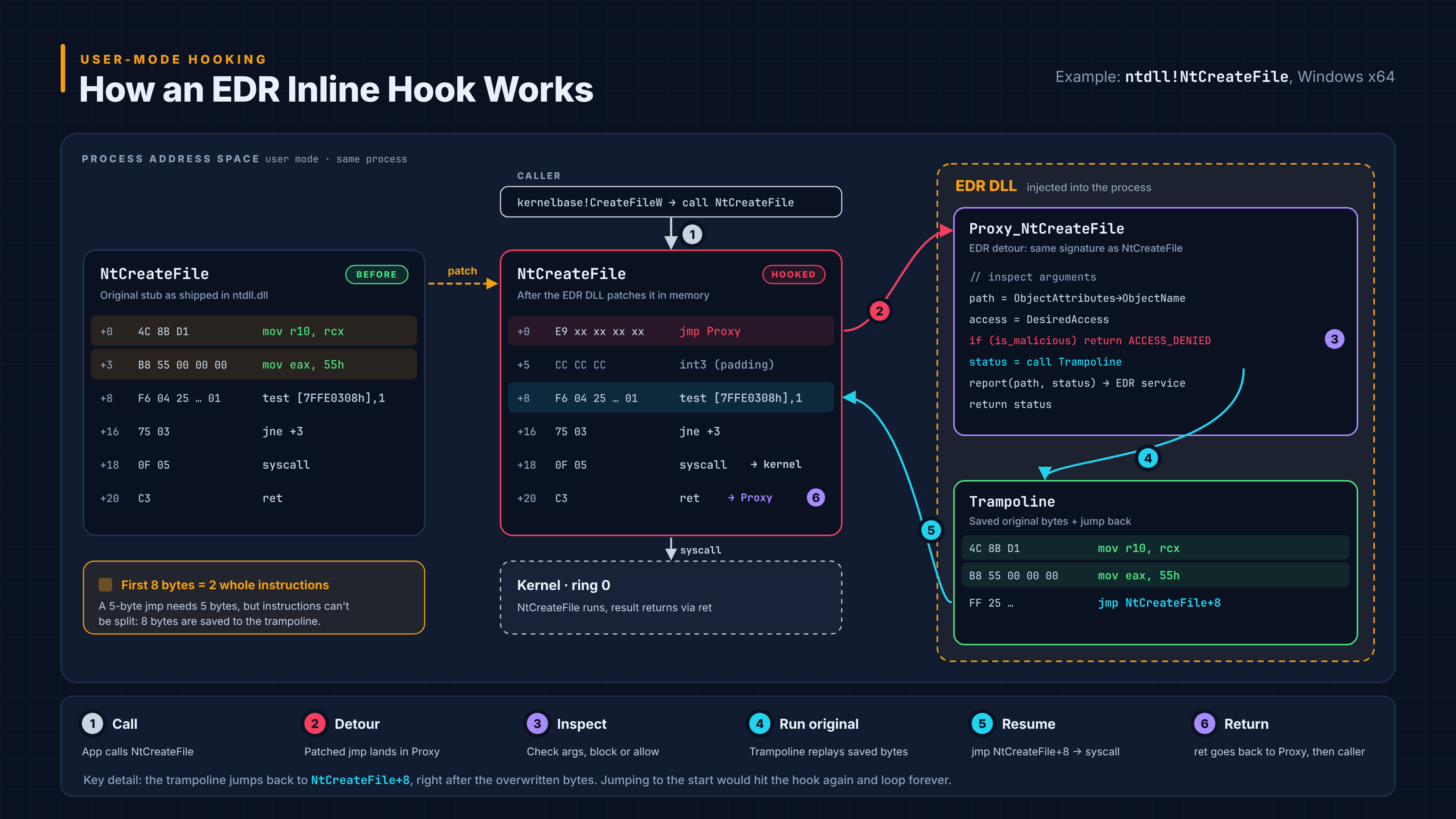
User-Mode Hooking and Monitoring
Why EDRs Hook ntdll.dll
EDRs hook APIs that malware commonly abuses, to observe suspicious behavior as it happens.
Where: Hooks sit on ntdll.dll functions, the last stop in user mode before a system call, so the EDR sees every request first.
What: Typical targets include memory allocation, memory protection changes, thread creation, and process injection APIs (e.g., NtAllocateVirtualMemory, NtProtectVirtualMemory, NtCreateThreadEx). Response: If the behavior looks malicious, the EDR can block the call or terminate the process.
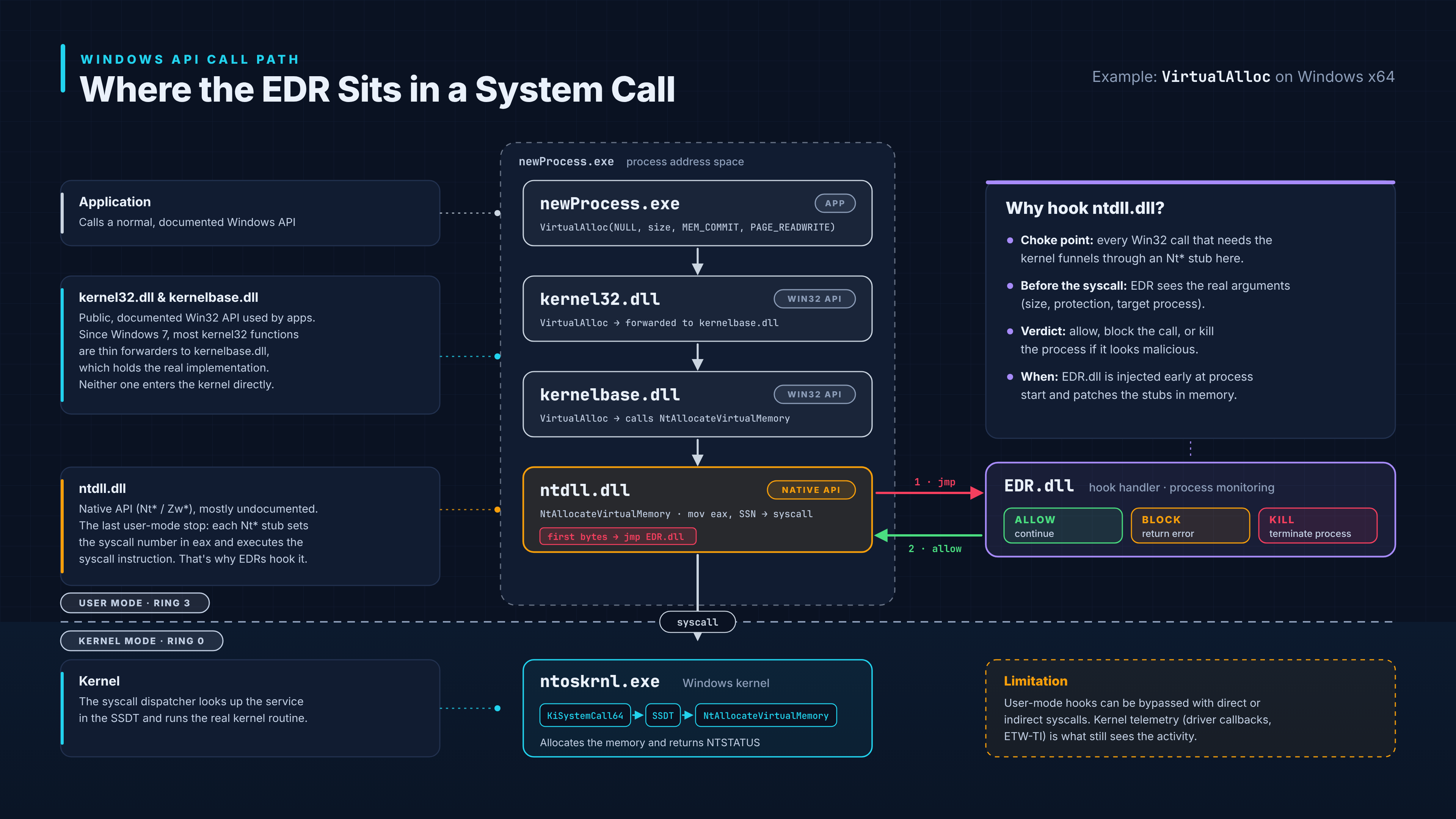
Commonly Hooked APIs in EDR Solutions
| API | Typical Use / Detection Relevance |
|---|---|
NtCreateFile | Opens or creates files and device handles; monitored to observe file-system activity. |
NtCreateThreadEx | Creates threads; may be relevant when investigating remote thread creation and process injection. |
VirtualAllocEx | Allocates memory in another process; can be associated with cross-process code injection. |
WriteProcessMemory | Writes data into another process’s memory; a potential indicator of process injection. |
VirtualProtect | Changes memory protection permissions; suspicious when memory becomes executable or transitions from writable to executable. |
LoadLibraryExW | Loads a DLL into a process; monitored to investigate module loading, DLL injection, and unusual library-loading behavior. |
Kernel Callback Mechanisms
Kernel callbacks enable EDR drivers to receive notifications about selected system events.
For example, Windows can notify a registered callback when a process is created.
EDR solutions may also rely on complementary monitoring mechanisms, including:
Network filter drivers monitor or filter network traffic.
File system minifilter drivers observe and, where appropriate, filter file system I/O operations.
Defense in depth: Bypassing or impairing one monitoring mechanism does not necessarily evade detection, as other telemetry sources and detection mechanisms may still identify the activity.
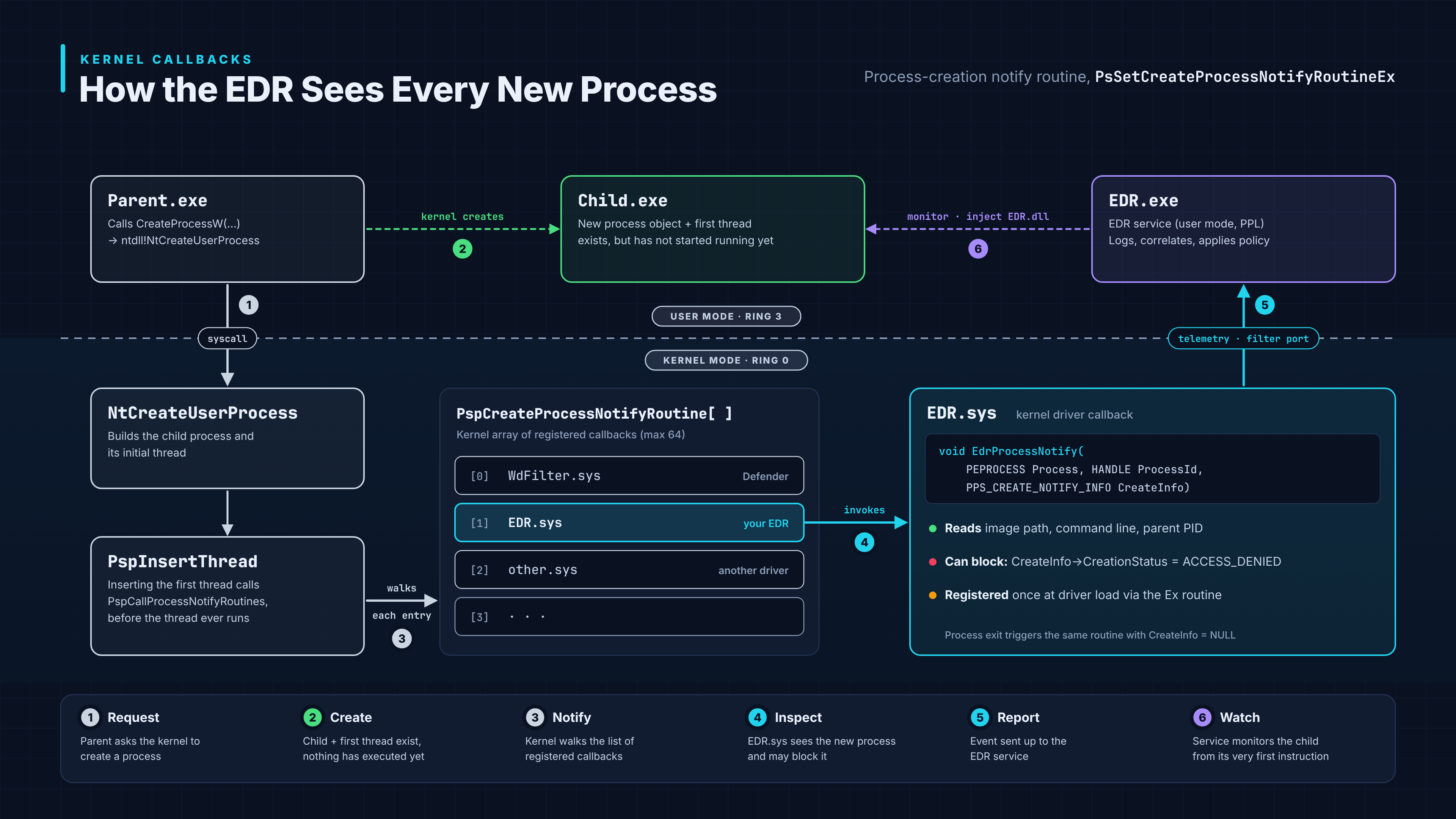
Windows Kernel Callback Reference
| Notification Routine | Purpose |
|---|---|
PsSetCreateProcessNotifyRoutine | Receives notifications when a process is created or exits. The Ex variant supports additional capabilities, including the ability to block process creation in supported scenarios. |
PsSetCreateThreadNotifyRoutine | Receives notifications when a thread is created or exits. |
PsSetLoadImageNotifyRoutine | Receives notifications when an executable image or DLL is loaded or mapped into a process. It does not independently prevent image loading or remapping. |
ObRegisterCallbacks | Registers callbacks to monitor and potentially restrict access rights requested when process or thread handles are created or duplicated. |
CmRegisterCallback | Receives notifications about registry operations, allowing drivers to monitor and, where supported, filter registry activity. |
Event Tracing for Windows (ETW)
Core Concept
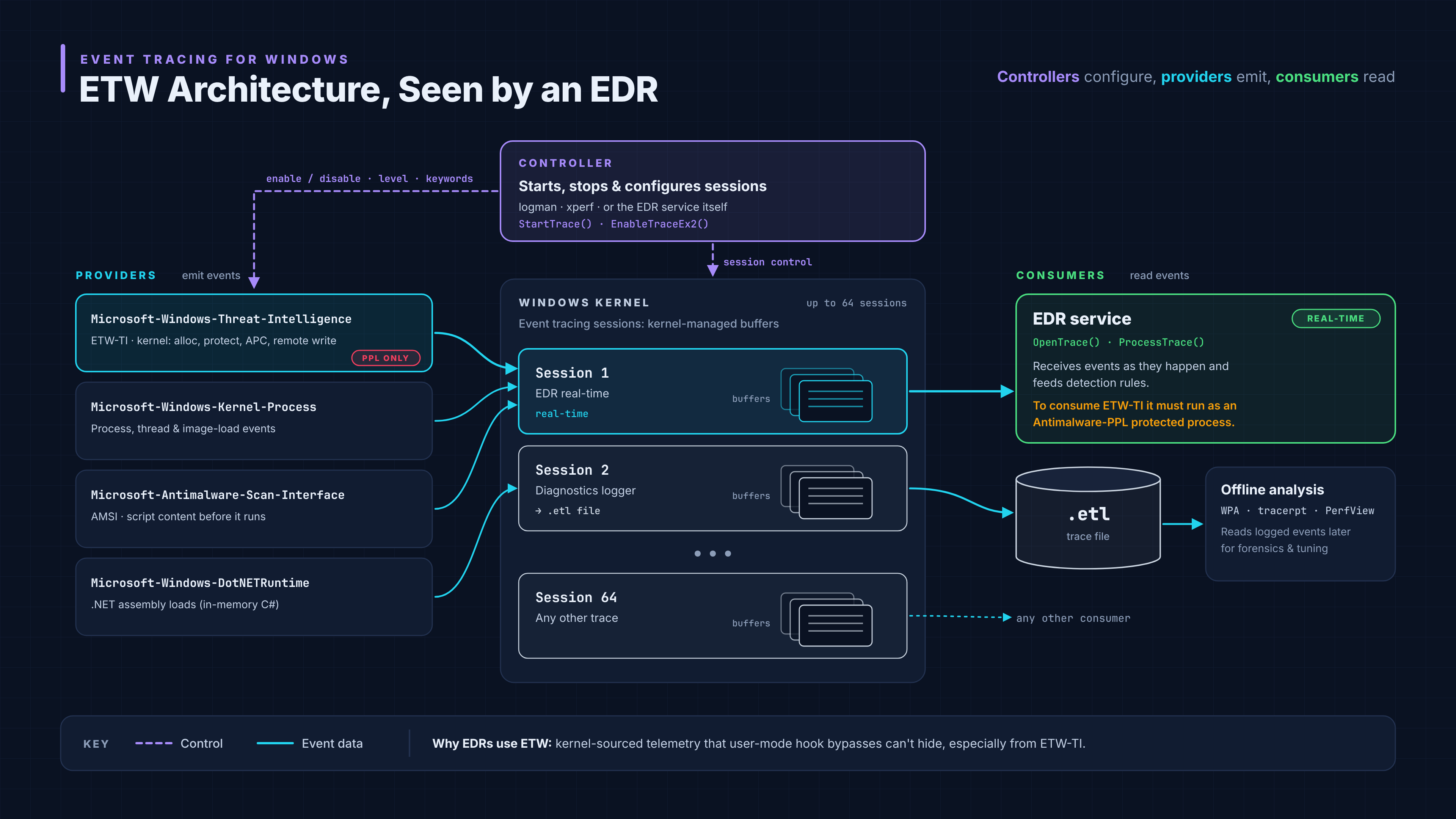
- ETW is a built-in Windows tracing infrastructure that enables kernel-mode and user-mode components to generate structured event telemetry.
- It provides visibility into system activity, application behavior, and selected memory-related operations.
Architecture
- Provider: Generates and publishes event data.
- Controller: Configures tracing sessions, enables providers, and manages event collection.
- Consumer: Processes and analyzes collected events, such as an EDR telemetry pipeline.
Event Flow:
Provider → Controller (Session Management) → Event Buffers → Consumer (EDR)
Execution Behavior
- Events are recorded as the instrumented components emit them, providing near-real-time visibility into system activity.
- ETW supports behavioral detection, activity correlation, threat hunting, and post-incident investigation.
- Depending on the enabled providers, ETW can expose telemetry related to process execution, thread activity, image loading, network operations, and selected memory-related events.
Elastic Defend Case
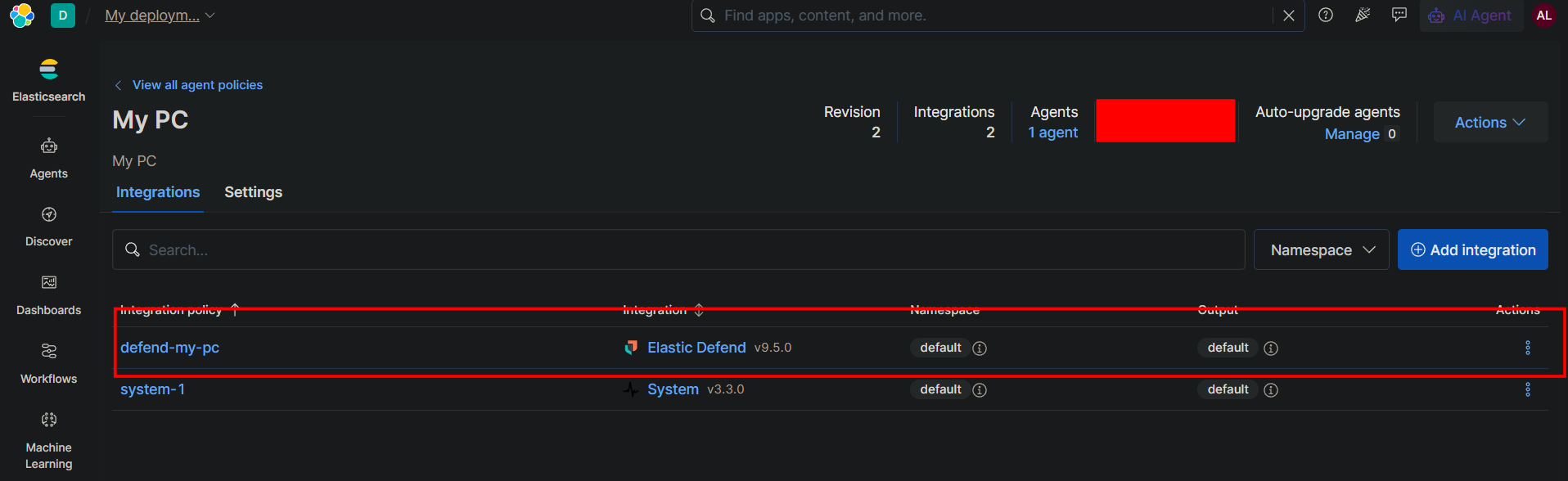
A Case in Elastic Security is a digital investigation file that brings together all the evidence and alerts related to a security incident in one place, where Elastic Defend alerts can be attached so the team can investigate them together instead of having them scattered. The Case gathers full endpoint telemetry processes, files, network, and memory along with a process tree and timeline to reconstruct the attack, and it correlates host activity with other sources such as cloud, identity, and network to detect multi-stage attacks. It also streamlines response by allowing host isolation and termination of the malicious process directly from within the investigation.
This is the Integrations page of the “My PC” policy in Elastic, showing that Elastic Defend is enabled and running on the host.
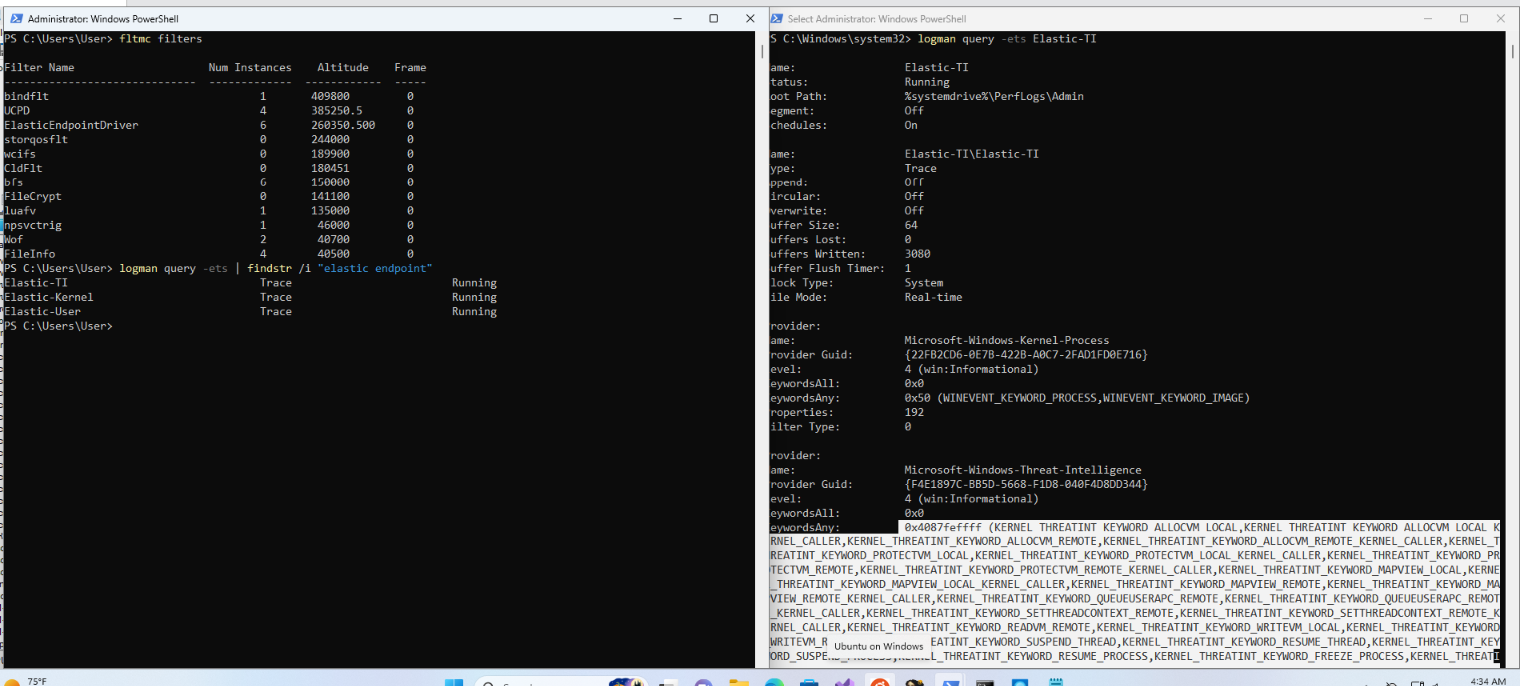
This output is live proof of everything we discussed. Brief comment:
Left side:
fltmc filters→ showsElasticEndpointDriverat altitude 260350.5 — this is Elastic’s minifilter watching files from the kernel.logman→ three ETW sessions are Running:Elastic-TI,Elastic-Kernel, andElastic-User. So Elastic receives its telemetry from the kernel via ETW, not from inside the processes.
Right side (details of Elastic-TI):
- File Mode: Real-time → it consumes events in real time.
- Subscribed to key providers:
Microsoft-Windows-Kernel-Process→ process creation and image (DLL) loads.Microsoft-Windows-Threat-Intelligence(ETW-TI) → this is the heart of it. The enabled keywords (ALLOCVM,PROTECTVM,WRITEVM_REMOTE,SETTHREADCONTEXT_REMOTE,QUEUEUSERAPC_REMOTE…) are exactly the sensitive APIs used by injection and shellcode techniques.
Bottom line: this screenshot proves that Elastic sees memory-injection operations (WriteProcessMemory, VirtualAllocEx…) from the kernel via ETW-TI, with no API hooking and no DLL inside the processes exactly what we described, and here’s the proof in front of you.
ETW-TI (Threat Intelligence) Technical
- ETW Threat Intelligence (ETW-TI) is a specialized ETW provider introduced in Windows 10 version 1709 (Fall Creators Update, RS3).
- It exposes security-relevant telemetry designed to help endpoint security products gain visibility into suspicious activities and advanced attack techniques.
- Its restricted access model makes it more difficult for ordinary applications and malware to consume or interfere with this telemetry through conventional ETW interfaces.
- EDR solutions can use this telemetry to identify suspicious execution patterns and strengthen behavioral detection.
Windows Threat Intelligence Event Tracing
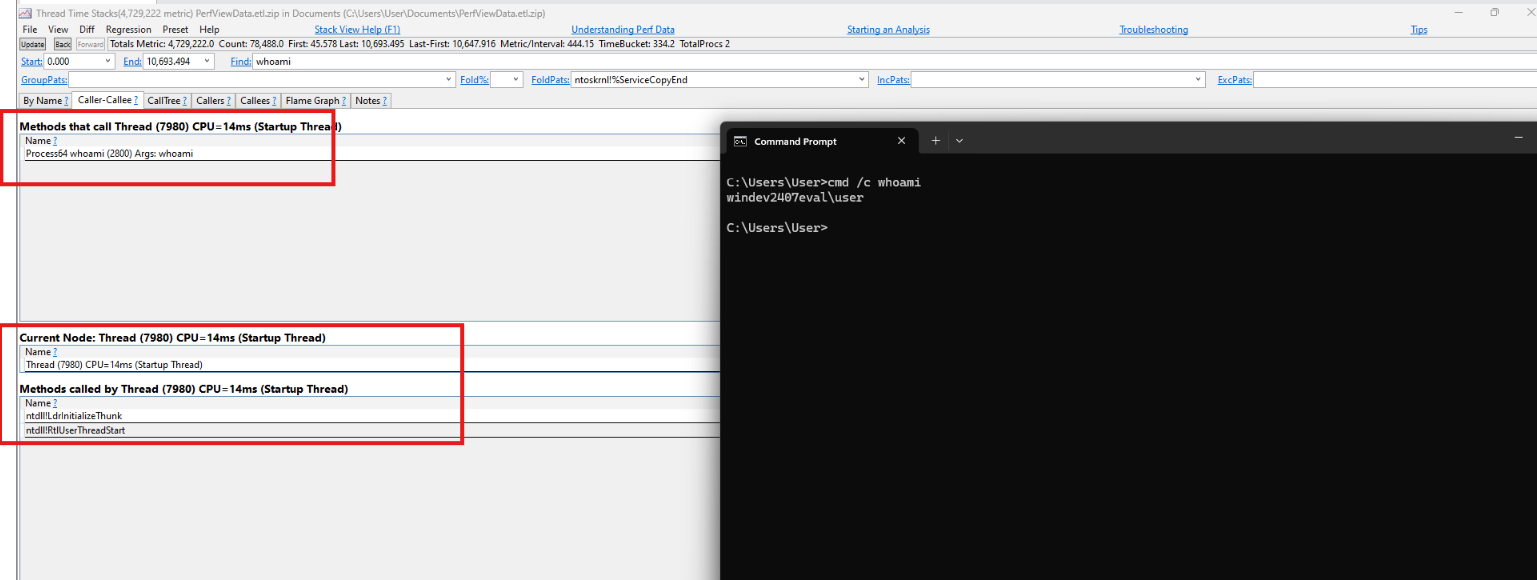
PerfView shows a clean call stack for the whoami process: the Startup Thread (7980) begins at ntdll!RtlUserThreadStart then ntdll!LdrInitializeThunk exactly the legitimate sequence that Elastic relies on via ETW-TI to distinguish normal activity from malicious injection.
Process Activity Telemetry: Call Stack Analysis
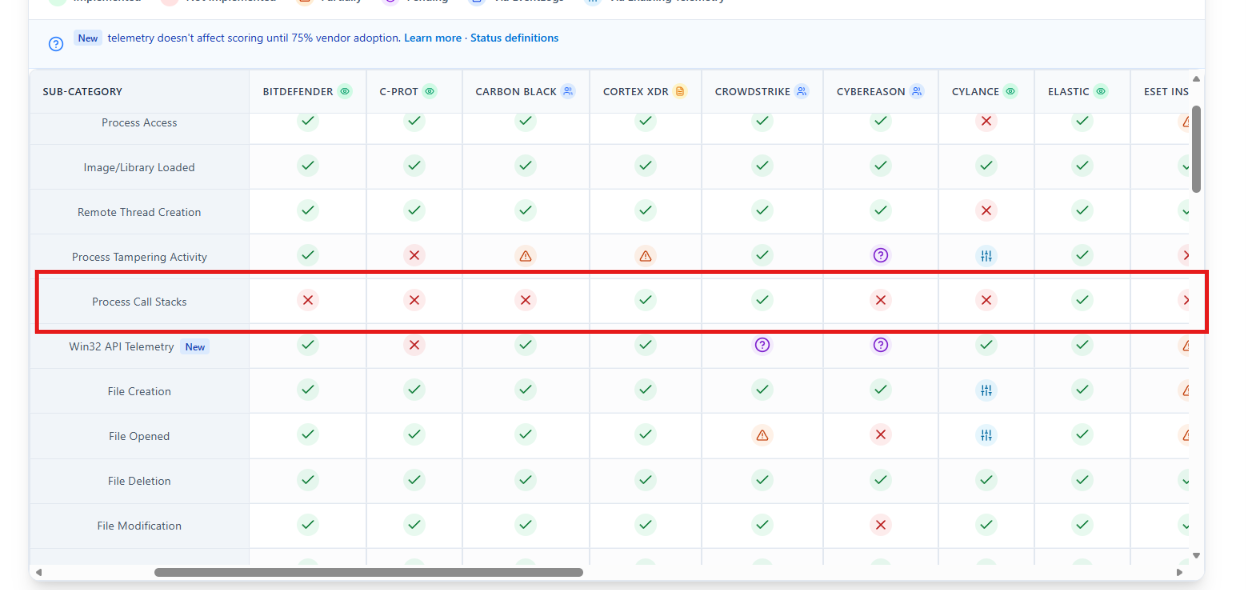
- Not all EDR solutions perform call-stack analysis. However, products such as Elastic Security, CrowdStrike, and Cortex XDR leverage call-stack information as part of their detection capabilities.
- Call stacks provide execution context by revealing the sequence of function calls leading to a particular operation.
- This context helps security products distinguish legitimate system activity from suspicious execution patterns and identify potentially malicious behavior.
Summary: EDR Detection Architecture
- Multi-Layered Detection: EDR solutions combine multiple detection layers, including user-mode instrumentation, kernel-mode monitoring, and backend behavioral analysis.
- Kernel-Level Visibility: Kernel callbacks provide visibility into critical system events, including process and thread creation.
- ETW Telemetry: Event Tracing for Windows (ETW) provides detailed execution telemetry covering process activity, thread operations, image loading, and selected memory-related events.
- Advanced Behavioral Analysis: Some EDR solutions analyze call stacks, memory characteristics, and execution patterns to identify suspicious activity.
- Defense in Depth: Combining multiple telemetry sources and detection mechanisms improves visibility and reduces reliance on any single monitoring technique.
References
https://www.microsoft.com/en-us/security/business/security-101/what-is-edr-endpoint-detection-response
DEFCON32: https://www.youtube.com/watch?v=PmqvBe1LSZc
https://www.vaadata.com/en/blog/edr-endpoint-detection-and-response-how-it-works-and-detection-mechanisms/
https://learn.microsoft.com/en-us/windows-hardware/test/weg/instrumenting-your-code-with-etw
https://www.elastic.co/security-labs/call-stacks-no-more-free-passes-for-malware
https://www.elastic.co/docs/reference/integrations/endpoint
https://www.elastic.co/security-labs/blog/kernel-etw-best-etw
https://0xmaz.me/posts/HookChain-A-Deep-Dive-into-Advanced-EDR-Bypass-Techniques/
https://dev.to/excalibra/edrxdr-bypass-and-detection-evasion-techniques-an-investigation-of-advanced-evasion-strategies-5ckf